Time and billing for freelancers: what online time billing software needs to do
By the Billebly team · Published 15 October 2026 · Last updated 24 October 2026
"Time and billing" is an old term from law firms and accounting practices: one piece of software to log billable hours, a separate process to turn those hours into an invoice. Freelancers and small consultancies have inherited the same two-step problem, just with newer tools. A timer app on one side, an invoicing tool or spreadsheet on the other, and a manual transfer between them every time you bill. Moving that online doesn't fix anything by itself unless the two halves are actually connected.
What the term actually covers
Online time and billing (also called web-based time billing) describes any setup where tracked hours and invoicing live in the same system, instead of two, and run in a browser instead of on one office computer. That's the whole point of the phrase: "time" (logging what you worked on and for how long) and "billing" (turning that into an invoice a client pays) used to require buying one package for each. Cloud software collapsed the cost and setup of both, but a lot of what's sold as "online time and billing" is still just a time tracker and an invoice generator bolted together, with an export-and-import step in between.
The difference that actually matters isn't "cloud" versus "desktop." It's whether an hour you log this afternoon can become a billable line item on an invoice without you touching a spreadsheet, a CSV export, or a copy-paste in the middle.
What a real online time and billing setup needs to do
- Log hours against a specific client or project, not a general bucket you have to sort out later
- Tell billable and non-billable time apart, so an internal call or a favor for a client never accidentally shows up on an invoice
- Carry an hourly rate per client or project, since most freelancers don't charge every client the same amount
- Turn logged hours directly into invoice line items, with no retyping or reconstructing a timesheet from memory
- Mix tracked hours with flat fees on the same invoice, for the common case of a project rate plus a few extra billable hours
- Send the result with a way to actually get paid, usually a hosted payment link, not just a PDF attached to an email
Drop any one of these and you're back to manual reconciliation, just with nicer software doing each half.
| Step | Two separate tools | Connected time and billing |
|---|---|---|
| Logging hours | Timer app, exported or copied later | Logged directly against the client and project |
| Building the invoice | Retype hours from a timesheet | Logged hours pulled in as line items |
| Mixed billing (hours + flat fee) | Manually combined in a spreadsheet or invoice tool | Added on the same invoice, no reconciliation |
| Getting paid | Separate payment link or bank transfer, tracked by hand | Hosted payment link tied to that invoice |
The quick way to tell if a tool actually connects the two
Ask what happens between logging an hour and it appearing on an invoice. If the honest answer involves an export, an import, or retyping a number, it's two tools wearing one name, not real online time and billing.
Why the gap costs more than it looks like
A rebuilt timesheet is where hours quietly disappear: a call you forgot to log the moment it ended, a quarter-hour rounded down because you're reconstructing the week from memory on a Friday. None of that shows up as an obvious loss. It just means every invoice is slightly smaller than the work actually done, for reasons nobody would notice unless they compared the week's actual hours against what got billed. That gap has a name, realization, and it sits right next to billability: the share of your week that was billable in the first place.
The same gap also slows down getting paid in the first place. If building an invoice means stopping to pull numbers from a separate timesheet, billing becomes a task you put off until you have a free hour for it, rather than something that happens the moment a project or a month wraps up. See how to set your freelance hourly rate for the other side of this: a rate only pays off if the hours behind it actually make it onto an invoice.
Where time tracking and invoicing fits
Billebly runs both halves in the same free account. Start a live timer or log hours after the fact against a client's project, mark anything non-billable so it never reaches an invoice, and when it's time to bill, pull the logged hours straight onto one: mixed with flat line items if the project needs it, sent with a hosted payment link so the client can pay online.
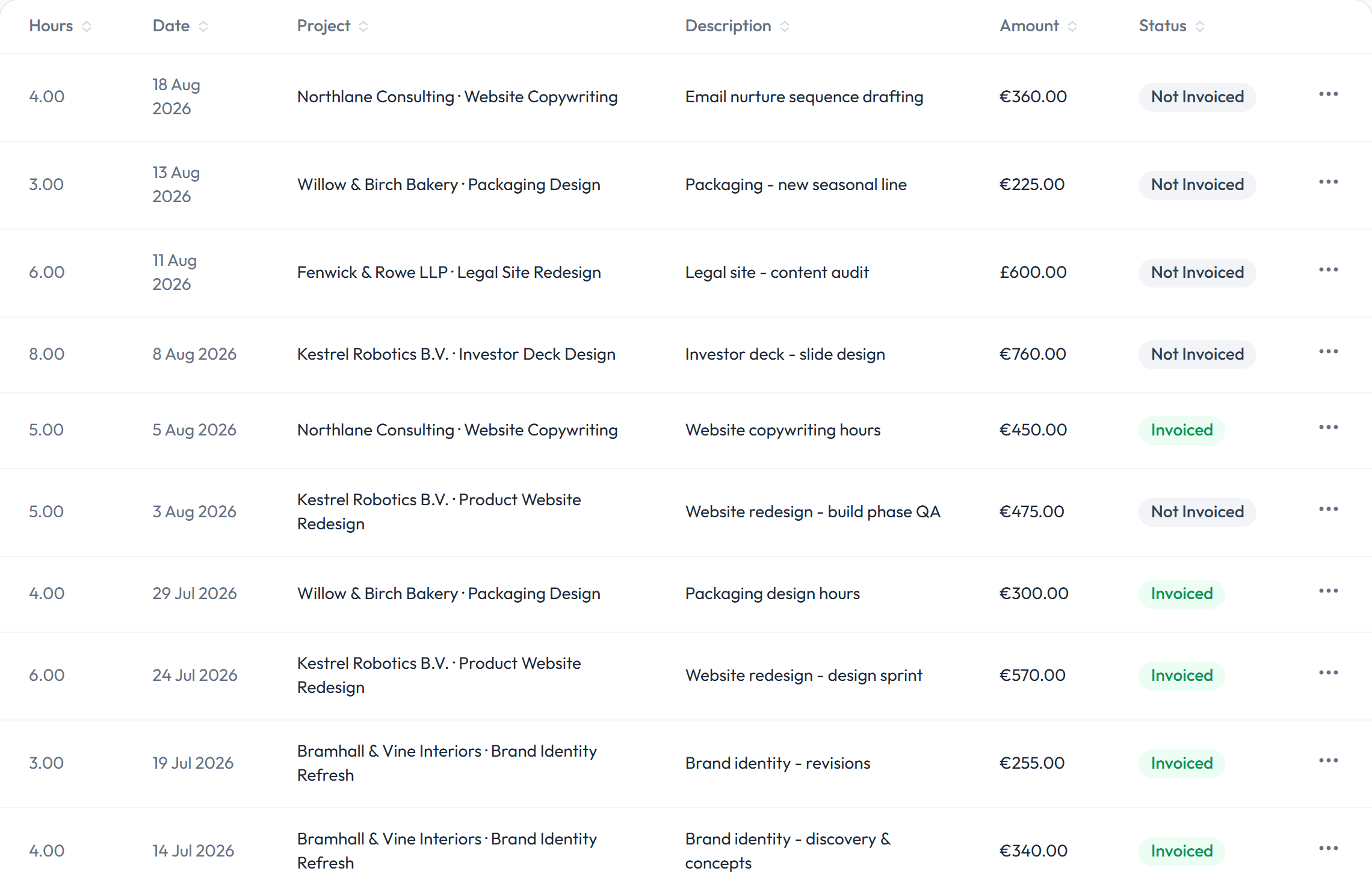
Stop rebuilding a timesheet every time you bill
Track hours against each client's projects and turn the billable ones into an invoice, in the same free account.
If you just need one timesheet or invoice right now
Not every job needs a full account. For a single client or a one-off project, the free timesheet generator logs entries by date and project, totals them, and turns them straight into an invoice with the invoice generator, no signup and nothing stored. It's the same math a full time-and-billing setup runs, just without a login, for the week you genuinely don't need one.
The honest trade-off: a one-off generator doesn't remember a client's rate from last month, doesn't flag which hours are already invoiced, and won't tell you an invoice got paid. That's fine for an occasional project. It's the gap that reopens once you're billing the same handful of clients every month, which is when connecting time tracking and invoicing in one account starts paying for itself.